𝐓𝐡𝐞 3-𝐏𝐢𝐥𝐥𝐚𝐫 𝐒𝐲𝐬𝐭𝐞𝐦 𝐁𝐞𝐡𝐢𝐧𝐝 𝐌𝐲 𝐀𝐈-𝐏𝐨𝐰𝐞𝐫𝐞𝐝 𝐏𝐌 𝐖𝐨𝐫𝐤𝐟𝐥𝐨𝐰
How AI Transformed My PM Workflow from Bottleneck to Strategic Advantage

Most Product Managers eventually hit a scaling wall, not because the work is too complex, but because the manual overhead becomes unsustainable:
Documentation takes more time than strategic thinking
Information is scattered across notes, Slack, and email
Every new doc requires hours of reformatting and restructuring
Constant context switching between tools drains focus
Dependencies, risks, and health scores are tracked manually
Documentation quality varies across initiatives
The breaking point isn’t the complexity of the work; it’s doing it manually when AI can automate it.
This guide introduces the AI-powered 3-Pillar Framework, which eliminates manual overhead and frees up time for high-leverage product work.
About me: I’m Khushal Adlakha, a Product Manager at Autodesk. I built this system to solve my own problem and shared a preview of it in this post. This guide introduces the AI-powered 3-pillar framework that transformed my workflow.
The 3-Pillar System Architecture
The system is built on a simple principle: Information flows through layers of automated processing, each adding value without human friction.

Each pillar is independent but designed to feed the next. Context is preserved automatically across all initiatives.
Pillar 1: CAPTURE - Automatic Note Organisation
The Challenge: Notes scattered across meetings, Slack, and emails. Critical context gets lost in the chaos. The more initiatives you juggle, the harder it becomes to find the right detail at the right time.
The Solution: Capture information wherever it naturally occurs, in Slack, during meetings, or in quick follow-ups, and let your LLMs handle the organisation.
AI automatically classifies, tags, and links notes to the right initiative or document, so context isn’t just stored, it’s preserved and actionable.
How It Works:
The CAPTURE system is designed for flexibility; it adapts to how Product Managers actually work, not the other way around.
Dual Input Options:
notes.md: Quick capture for cross-initiative items, unclear categorisation, or rapid thoughts
Initiative folders: Direct note-taking when context is clear (eg. initiative-specific meetings notes)
Keyword Detection: Cursor detects initiative names in
notes.mdautomatically (SSO Integration, Mobile App 2.0 Launch, etc.)Smart Routing: Content from
notes.mdgets routed to correct initiative folders with timestamps and source attribution, so no context is lost in transitionStructured Organisation: Notes are automatically structured based on your preferred framework. I personally use the LNO framework by Shreyas Doshi.
Example Workflow: Auto-Routing from notes.md:
# Scenario: Daily standup with engineering team
# Multiple initiatives discussed - quick capture in notes.md

### Daily Standup - Engineering Team
Mobile App 2.0 Updates:
- iOS beta build ready for internal testing next week
- Android offline sync implementation 80% complete

Enterprise SSO Integration:
- SAML connector working with Okta and Azure AD
- Customer pilot scheduled with MegaCorp next Friday

↓ (Cursor processes and routes)

# Routes to Mobile_App_2.0_Launch/RunningNotes.md
[2025-10-04] Daily Standup Updates
- iOS beta build ready for internal testing next week
- Android offline sync implementation 80% complete

# Routes to Enterprise_SSO_Integration/RunningNotes.md
[2025-10-04] Daily Engineering Updates
- SAML connector working with Okta and Azure AD
- Customer pilot scheduled with MegaCorp next Friday
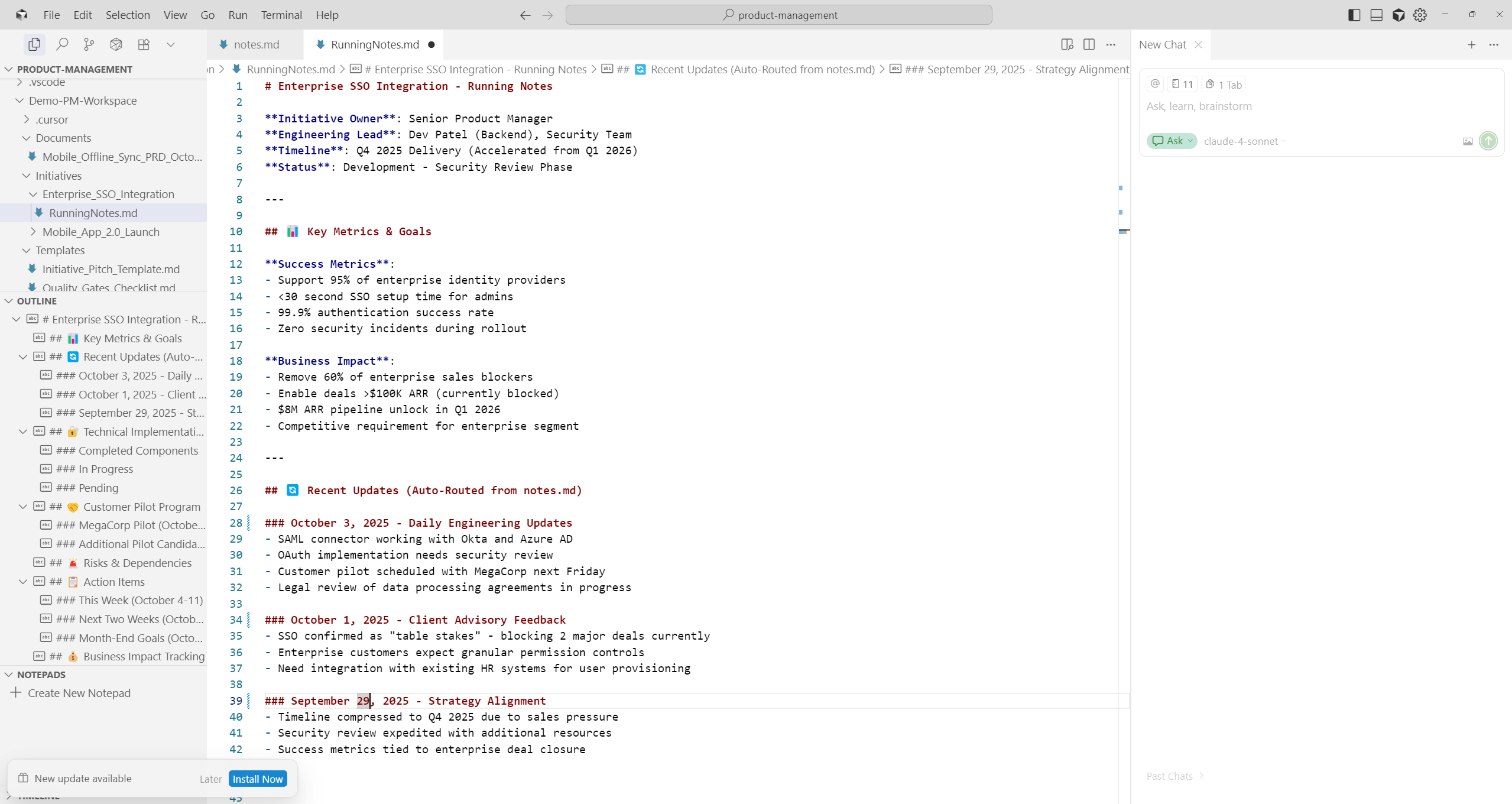
Enterprise SSO Integration RunningNotes.md showing auto-routed updates from notes.md, organized by date and sourceResult: Zero manual organisation. Complete context preservation. Write where it makes sense, the system handles the rest.
Implementation Details:
Uses Cursor’s
.cursorrules or Claude code agentsfor keyword detectionMarkdown files only - no databases, no complex tools
Timestamps maintain chronological context
Source attribution for traceability
Pillar 2: CREATE - Template-Driven Document Generation
The Challenge: Starting from blank pages. Inconsistent document structure means multiple review cycles.
The Solution: Template library that auto-populates from captured context, transforming raw notes into structured, high-quality documents in minutes
How It Works:
Template Library: PRDs, executive summaries, initiative pitches, technical specs
Context-Aware Generation: Cursor pulls from initiative notes automatically
Structured Format: Every template enforces PM-level thinking ie. clarity, impact, and measurable outcomes.
Rapid Iteration: 10 minutes from customer problem to executive-ready document
Template Types:
Real Example - Mobile Offline Sync PRD:
From running notes captured in notes.md and Mobile_App_2.0_Launch/RunningNotes.md
# Input from notes:
- Client feedback: Mobile offline sync is #1 requested feature
- Engineering: SQLite database with sync conflict resolution
- Architecture: Background sync every 5 minutes when online
- Business context: $3M ARR from improved retention
↓ (Apply PRD Template)
# Generated PRD includes:
## Executive Summary
**Problem Statement**: Enterprise users lose productivity when working in
low-connectivity environments, creating 40% drop in mobile app engagement.
**Business Impact**: Projected 30% increase in mobile DAU, $3M ARR from
improved retention, competitive parity with leading platforms.
## Technical Solution Architecture
- **Local Database**: SQLite implementation with optimistic concurrency control
- **Sync Strategy**: Bidirectional sync with last-write-wins conflict resolution
- **Background Sync**: 5-minute intervals when online
## Success Metrics & Validation
- **Offline Reliability**: 95% successful sync rate
- **Performance**: <2 second sync completion
- **User Adoption**: 40% of DAU using mobile within 3 months
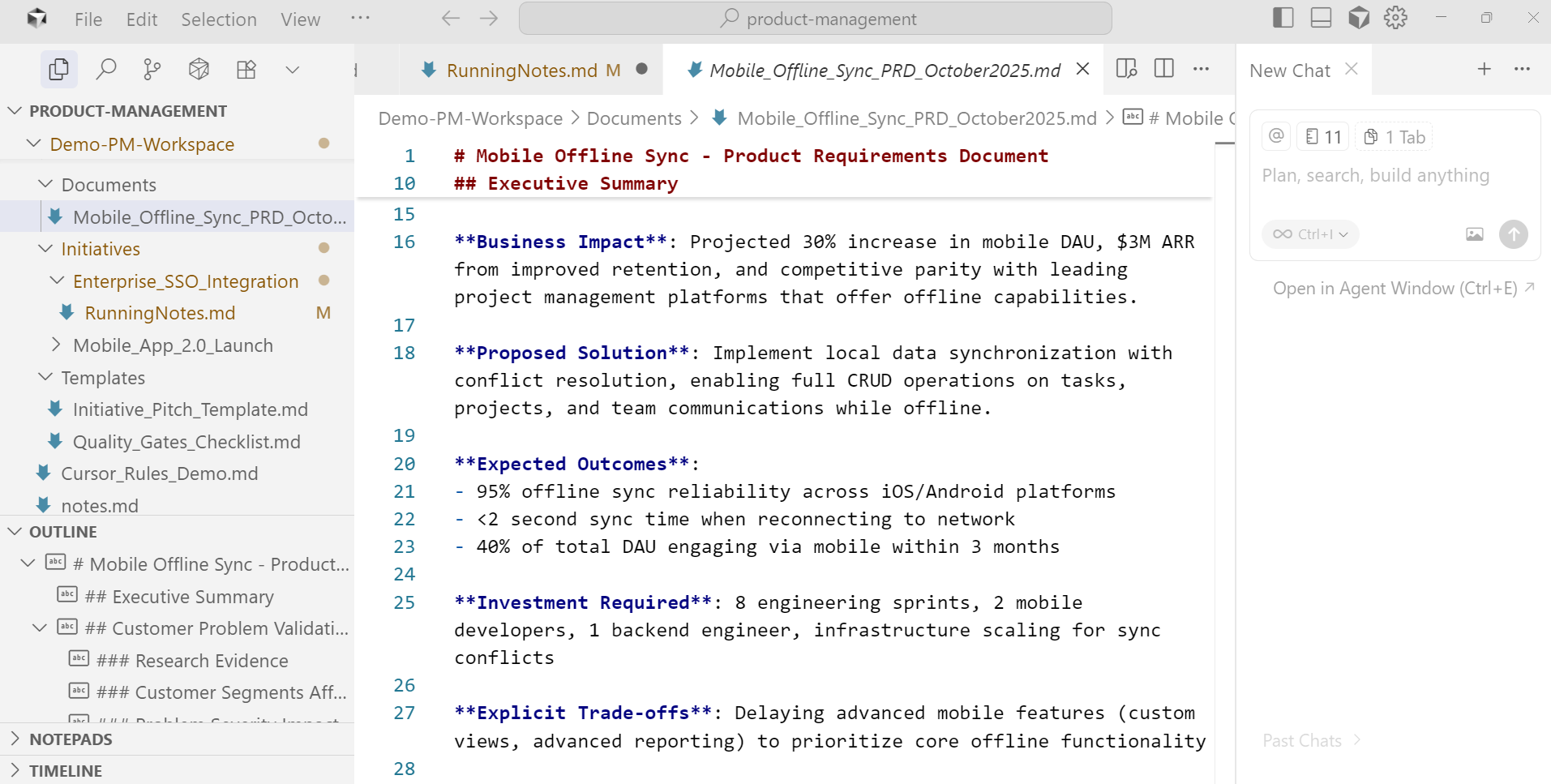
Generated Mobile Offline Sync PRD with auto-populated Executive Summary and business contextResult: Automated generation eliminates manual work, and every document meets the same strategic and structural standard.
Pillar 3: PROCESS - Quality Gate Validation
The Challenge: Inconsistent document quality. Missing critical sections. Multiple review rounds.
The Solution: 4-gate system that validates before human review.
How It Works:
The system enforces PM-level systematic thinking through four validation gates:
Gate 1: Purpose Validation
Is the problem clearly defined?
Are success metrics specific and measurable?
Is the target audience identified?
Gate 2: Content Validation
Are all required sections present?
Is technical feasibility addressed?
Are dependencies documented?
Are risks identified?
Gate 3: Quality Validation
Is the writing clear and concise?
Are claims backed by data?
Is the document internally consistent?
Are assumptions explicitly stated?
Gate 4: Standards Validation
Does it follow company formatting standards?
Are stakeholders properly identified?
Is the approval process clear?
Are timelines realistic?
Automatic Feedback Loop:
Document Draft → Run Quality Gates → Identify gaps → Provide specific feedback → Cursor suggests improvements → Review and approveReal Example- Quality Gate Feedback:
❌ Gate 2 Failed: Content Validation
- Missing: Technical feasibility analysis
- Missing: Resource requirements
- Incomplete: Risk mitigation strategies

Suggested additions:
1. Add engineering complexity assessment
2. Specify team size and timeline
3. Document top 3 risks with mitigation plans
Result: Documents pass the executive review. No back-and-forth. Consistent quality across all initiatives.
Implementation Details:
Quality Gates Checklist in
.cursorrulesAutomatic validation before the document is marked complete
Specific, actionable feedback (not generic “improve this”)
Enforces systematic thinking patterns
How The Pillars Work Together: Complete System Integration
The power isn’t in individual pillars, it’s in how they connect.
Real Daily Workflow Example (October 6, 2025):
Morning (Pillar 1: CAPTURE)
Daily standup at 9 am covering multiple initiatives
Write quick notes in
notes.md:
Mobile App 2.0: iOS beta ready, Android sync 80% complete
Enterprise SSO: SAML working with Okta/Azure, MegaCorp pilot Friday
Cursor auto-routes to
Mobile_App_2.0_Launch/RunningNotes.mdandEnterprise_SSO_Integration/RunningNotes.md
Mid-Morning (Pillar 2: CREATE)
Customer advisory call: “Mobile offline sync is #1 priority”
Apply the PRD template for the Mobile Offline Sync feature
Cursor auto-populates from running notes: technical architecture, customer feedback, business impact
10 minutes → Complete PRD:
Mobile_Offline_Sync_PRD_October2025.md
Before Strategic Review (Pillar 3: PROCESS)
Run Quality Gates validation on PRD
System validates: ✅ Purpose ✅ Content ✅ Quality ✅ Standards
Document includes: problem validation, technical solution, success metrics, explicit trade-offs
PRD is ready for strategic review with all gates passed
Result: Morning standup → Customer feedback → Complete PRD ready for executive review, same day. Minimal manual document work.
Why This System Works
It’s not about the tools. It’s about the workflow.
The system works because AI handles what AI does best, i.e. pattern matching, routing, validation, while you focus on what requires human judgment: strategy, trade-offs, priorities.
The Architecture:
Flexible capture → Write naturally, organise automatically
Template generation → Context becomes documents without manual work
Quality enforcement → Consistency by design, not by effort
What makes it different:
No new tools to adopt (just Cursor + markdown)
No complex databases to maintain
No manual processes to remember
Context is preserved automatically across all work
The real impact: Documentation stops being a bottleneck. Quality becomes predictable. Strategic thinking time increases.
Next in the Series
Coming next: A deep-dive into Pillar 1 (CAPTURE): Notes Auto-Routing. I’ll show you the exact system that automatically organises your notes across initiatives, complete with real examples from the Demo-PM-Workspace.
You’ll see:
How keyword detection routes notes automatically
The LNO framework in action
Real initiative folder structures
Complete cursor rules configuration